
The embedded GPS sensor in the Lubn AI Lockbox 3 receives and updates the device’s coordinates each time the lockbox is powered on. Once activated, the lockbox location will appear in your PMS, giving managers clear visibility into where the device is deployed.
GPS data is available only when the GPS feature has been activated, the lockbox is installed outdoors, and the device has an active internet connection.
To access the location data of the lockbox, go to Devices and select the lockbox to view its location on the map in the device detail page.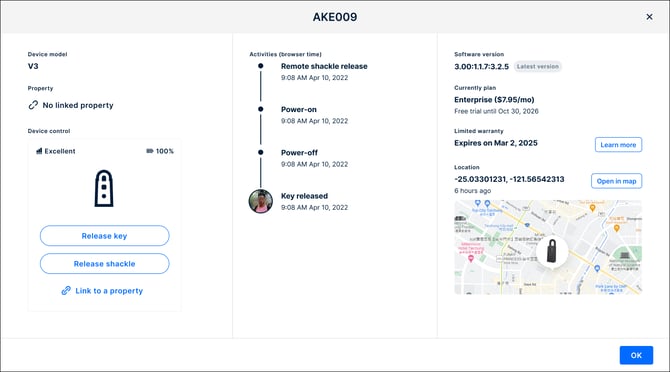
Earlier Lubn lockbox models do not include a built-in GPS sensor and therefore do not provide live location data. If you need location tracking for these models, we recommend placing an Apple AirTag or Tile inside the key storage compartment.
- If you move your AI Lockbox 3 to a new location, make sure to power it on at the new site so the system can refresh its GPS coordinates. The location shown in your PMS will always reflect the lockbox’s last known location. This does NOT represent live, real-time location data.