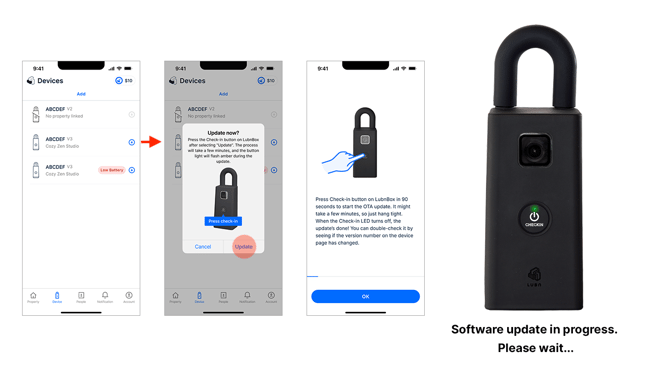
Lubn uses Over-the-Air (OTA) updates to continuously enhance lockboxes after purchase, improving performance, security, and functionality without requiring you to return devices to Lubn. Through these updates, Lubn can resolve issues, introduce new features, increase efficiency, and keep lockboxes updated like smartphones.
These OTA capabilities are a core advantage in the lockbox market, turning Lubn lockboxes into software-defined, upgradeable devices.
To update the lockbox software, first ensure the lockbox is at least 80% charged or connected to a charger. Make sure the lockbox is able to connect to the mobile network. Then, go to the Devices page in the app; if a newer version is available, a software update icon will appear. Tap “Update,” and then press the Check-in button on the lockbox. The lockbox will announce when it enters software update mode. The lockbox may power off and on during the process. The update typically takes about 8–10 minutes to complete.