
Review the detailed feature comparison for each plan below. This will help you identify which option aligns best with your workflow and how you can get the most value from our devices and service features.
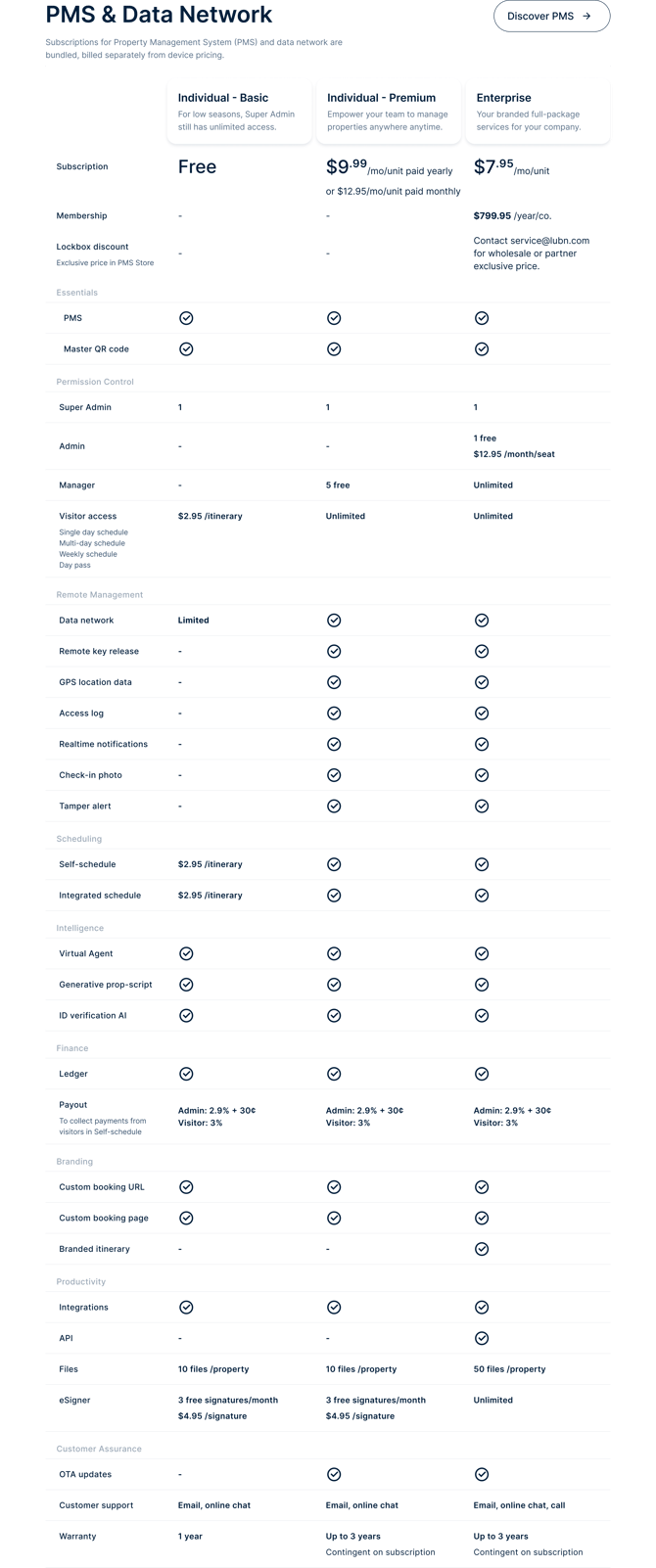
Subscriptions for Property Management System (PMS) and data network are bundled, billed separately from device pricing.
Subscriptions
-
Individual Basic is always free and is ideal for low seasons when you have few or no visitors. As the Super Admin, you continue to have access to Essential features. If you need to host occasional visits, you can simply pay as you go by using Lubn Credits to schedule those check-ins.
-
Individual Premium includes advanced features such as unlimited visit scheduling. You can choose a monthly subscription or save with an annual plan. As the Super Admin, you can add delegate Managers who help manage your properties but do not have lockbox management permissions. Under this plan, you are the only person authorized to manage lockboxes, and additional Admins cannot be added.
-
Enterprise account delivers the complete feature set, including support for multiple Admins and Managers, advanced branding (white-labeling), API access, and more. It is designed for organizations managing more than ten lockboxes with several Admins and Managers. With an annual Membership, your company benefits from the lowest monthly lockbox subscription rate. Wholesale partners receive access to exclusive contract lockbox pricing directly in the Lubn PMS Store.
Essentials
-
PMS (Property Management System) includes iOS, Android, and web applications that enable you and your team to operate devices, manage properties, and more.
- Master QR code allows you or your team members to release the lockbox shackle or key storage at any time.
Permission Control
-
Super Admin is the person who activates the lockbox and is responsible for billing. This role can control and manage all listed devices and properties, and can add or remove both Admins (Enterprise) and Managers. The Super Admin can configure member permissions at the feature level, such as allowing a member to release keys while restricting shackle release. Super Admins can schedule/revoke visits.
- Admin is a member in an Enterprise account who assists the Super Admin in managing devices and properties. Admins can access the lockboxes at anytime. Admins can also add or remove Managers. Admins can schedule/revoke visits.
- Manager is a member invited to manage properties only. Managers cannot view or manage your listed devices. Managers can schedule/revoke visits and access lockboxes at anytime for the properties assigned to them.
- Visitor can access the keys in the lockbox only during the scheduled timeframe. In the access itineraries, visitors can view property details, interact with the virtual agent, and invite additional guests, who receive their own itineraries without the access QR code.
For detailed permission comparison, refer to Permission Levels.
Remote Management
-
Data network: Lubn lockboxes are connected to LTE/5G mobile data network. As soon as the device is activated, the capability of connecting to the mobile network is available. The connectivity allows the device to send and receive data/commands wirelessly to and from the Admins or Managers in realtime. The network quality varies depending on the location. Normally, the network quality is better when there is less obstacles or outdoors.
- Remote key/shackle release: When the lockbox is connected to the mobile network, you and your team can remotely release the key storage or shackle from anywhere using the mobile app or web app.
- GPS location data: When lockbox GPS is activated and the device is connected to the mobile network, its location appears on the map in the device detail view. This helps you and your team locate lockboxes installed away from the target property and can assist in finding a missing lockbox.
- Access log: All access events, such as check-in, check-out, and overtime, are recorded in real time. You can review logs by time or pivot the view to see activities by visitor.
- Realtime notifications: When the lockbox is connected to the mobile network, you and your team receive real-time notifications whenever a lockbox event is triggered. These notifications also cover related feature activities, including Self-schedule events.
- Check-in photo: When the lockbox is connected to the mobile network, you and your team receive the photo captured by the device at the moment the visitor checks in. For clearer images at night, a bright porch light is recommended.
- Tamper alert: When the lockbox is connected to the mobile network, you and your team receive the tamper alerts when the following events take place.
- The lockbox is turned on without a successful check-in or check-out three times in a row within 10 minutes.
- The lockbox is turned on at night without any scheduled events.
- The key storage is forcibly removed without following the normal procedure.
Because mobile network coverage can vary by location, we recommend testing the device at the exact site where you plan to install the lockbox.
Scheduling
-
Access itinerary: The access itinerary includes the access QR code for the keys, property address, check-in and check-out time, a virtual agent to answer the visitor’s property questions, manager-provided access instructions, like/dislike buttons, and a private notes section. Visitors can use the itinerary to locate the property, access the keys, ask questions, submit like/dislike feedback visible to you, and record private notes they can review later in the app’s showing mode.
Because the itinerary is time-based, once it expires or is revoked by a manager, the access QR code disappears and the visitor can no longer access the keys. This ensures visitors always have the latest visit information while enabling managers to handle each scheduled visit without memorizing any codes.
After the schedule expires, visitors can still view the property information, interact with the virtual agent, and access their private notes—supporting continued interest and follow-up, especially for visitors such as buyer agents.
The itinerary service includes:
- System will send the visit itinerary via SMS and/or email as soon as it is scheduled.
- System will send an SMS reminder to the visitor the day before the scheduled visit.
- System will send an SMS reminder to the visitor a few hours before the scheduled check-out time.
-
Self-schedule is a dedicated property scheduling web page for you. Once you create your booking page URL, it enables you to easily share the URL via SMS, email, or other channels with your visitors. They can self-schedule visits at their convenience, eliminating the need for back-and-forth communication. You will receive instant notifications when a visit is scheduled, and if needed, you can revoke the visit. The self-schedule feature can be turned on or off for each property you manage in the Self-schedule. Learn more about Self-schedule.
- Integrated schedule is a lockbox scheduling widget that you can embed code directly into your website. It allows you to fully control your branding while scheduling lockbox access, without relying on Lubn Self-schedule templates. This tool supports HTML, React, Vue, and Angular.
Intelligence
- Virtual Agent is an AI-powered assistant that answers visitor questions via voice or text in real time, using the property scripts you provide and the built-in knowledge base. It can also proactively ask visitors questions to help you gather deeper insights about their interests. All conversations between visitors and the Virtual Agent are captured in real time and can be reviewed by you in the web app.
- Generative property script: To minimize off-topic or inaccurate answers (hallucinations), Virtual Agent is constrained to respond based on the property scripts you define when creating the property. To make script creation easier, the system can automatically generate draft scripts from your property specifications using the built-in generative AI.
-
ID verification AI: You can choose to require visitor IDs for Self-schedule bookings. Lubn’s ID verification AI reviews the uploaded ID image to help confirm its authenticity. While this verification assists in screening unexpected visitors, it is not a background check and may not be 100% accurate. If any self-scheduled visit appears suspicious, you can easily revoke it from your web Dashboard App.
The system stores the ID image for 14 days after the visit. After this retention period, to protect visitor privacy, Admins and Managers can only see the verification status, and the actual ID image is no longer visible.
To reduce the risk of scams or misuse, allow sufficient time to review self-scheduled visitors before their check-in. Granting immediate property access through Self-schedule may limit your ability to respond if a visitor’s intent is not appropriate.
Finance
-
Ledger is your central workspace for monitoring all transactions and payments. From here, you can review billing details, track payouts (revenue received from visitors), and manage payment methods. You can add a credit card for expenses and connect a Stripe account to receive income directly to your bank, helping you streamline and simplify financial management.
-
Payout: For property managers who charge for space usage, the Payout feature enables you to collect payments directly from visitors or short-term tenants. You define the pricing in Self-schedule for each property, and when Payout is enabled, visitors are prompted to pay as part of creating their itinerary. This centralizes payment collection and helps deliver a smooth, professional experience for both you and your visitors.
Branding
- Custom booking URL: You can create a custom subdomain URL for your Self-schedule booking page.
-
Custom booking page: Your brand logo will be displayed on your Self-Schedule booking page. This means that when visitors interact with the booking page, your brand will shine and leave a lasting impression.
- Branded itinerary: With an Enterprise account, your brand logo and system accent color are incorporated throughout each visitor itinerary, ensuring every guest experience consistently reflects your brand.
Productivity
- Integrations link your Lubn products with 3rd party services:
- Google Calendar: You can sync all scheduled visits to your Google Calendar so every event stays in one place.
-
APIs: As an Enterprise account holder, you gain exclusive access to Lubn's API as an option, allowing seamless integration between your system and ours.
-
Files let you upload property-related documents, such as leases and pet addendums, so you can keep everything organized with the corresponding property instead of scattered across your computer.
- eSigner is a digital signing tool that lets you send agreements to visitors, prospects, or contractors for secure electronic signatures and store the completed documents with the associated property.
Customer Assurance
- OTA updates allow you to keep your lockbox software current over the mobile network. This feature is available for devices on the Individual Premium or Enterprise plan.
- Customer support offers 24/7 online assistance whenever you have questions or encounter issues with the product.
- Warranty: See details at Limited Warranty.